<?xml version="1.0" encoding="utf-8"?><feed xmlns="http://www.w3.org/2005/Atom" ><generator uri="https://jekyllrb.com/" version="3.10.0">Jekyll</generator><link href="https://noaam.dev/blog/feed.xml" rel="self" type="application/atom+xml" /><link href="https://noaam.dev/" rel="alternate" type="text/html" /><updated>2026-11-14T09:36:57+00:00</updated><id>https://noaam.dev/blog/feed.xml</id><title type="html">Noaam</title><subtitle>Not Another Agent Manager. Your tools are fine; Noaam keeps track of them.</subtitle><entry><title type="html">Billing three clients when the agents work at the same time</title><link href="https://noaam.dev/blog/billing-three-clients/" rel="alternate" type="text/html" title="Billing three clients when the agents work at the same time" /><published>2026-11-08T11:00:00+00:00</published><updated>2026-11-08T11:00:00+00:00</updated><id>https://noaam.dev/blog/billing-three-clients</id><content type="html" xml:base="https://noaam.dev/blog/billing-three-clients/"><![CDATA[<p>Marta is a freelance backend developer in Kraków. She has three retainer
clients. Acme Surf runs a surf forecast app. Northwind is a small
bookkeeping product. Quill is a design agency she helps with their
document editor. Invoices go out from Harvest every Friday.</p>

<p>On her Mac there’s a <code class="language-plaintext highlighter-rouge">Clients</code> folder with one folder per client and the
repositories inside: <code class="language-plaintext highlighter-rouge">acme-surf/tidepool</code>, <code class="language-plaintext highlighter-rouge">northwind/ledgerline</code>,
<code class="language-plaintext highlighter-rouge">quill/quill</code>. Branches she’s working on live in worktrees next to them,
like <code class="language-plaintext highlighter-rouge">tidepool-offline-cache</code>. Noaam shows that same layout in its
sidebar, with her Claude Code sessions under the folder they run in.</p>

<h2 id="why-the-timer-stopped-working">Why the timer stopped working</h2>

<p>For years she ran a Harvest timer per client. She forgot to start it
about half the time and spent Sunday evenings rebuilding the week from
<code class="language-plaintext highlighter-rouge">git log</code>, Slack and her browser history.</p>

<p>Agents made it worse. On a normal Tuesday afternoon one session is
caching forecasts for Acme Surf, another is writing tests for Northwind’s
CSV import, and she’s on a Zoom call with Quill about PDF export. Three
clients are being worked on in the same forty minutes, and a timer can
only point at one of them.</p>

<p>Her clients also ask two different questions. Most of them want to know
how long she spent. Northwind asked last month whether they were paying
her full rate for hours an agent was working. She wanted to answer both
without guessing.</p>

<h2 id="what-noaam-was-already-writing-down">What Noaam was already writing down</h2>

<p>Noaam keeps a journal for each profile, one file per day, on her Mac. It
records which item she was looking at, whether she was typing or
clicking (only that, not what), which app was in front, when each agent
started and stopped working, and every commit. She never starts or stops
anything.</p>

<figure>
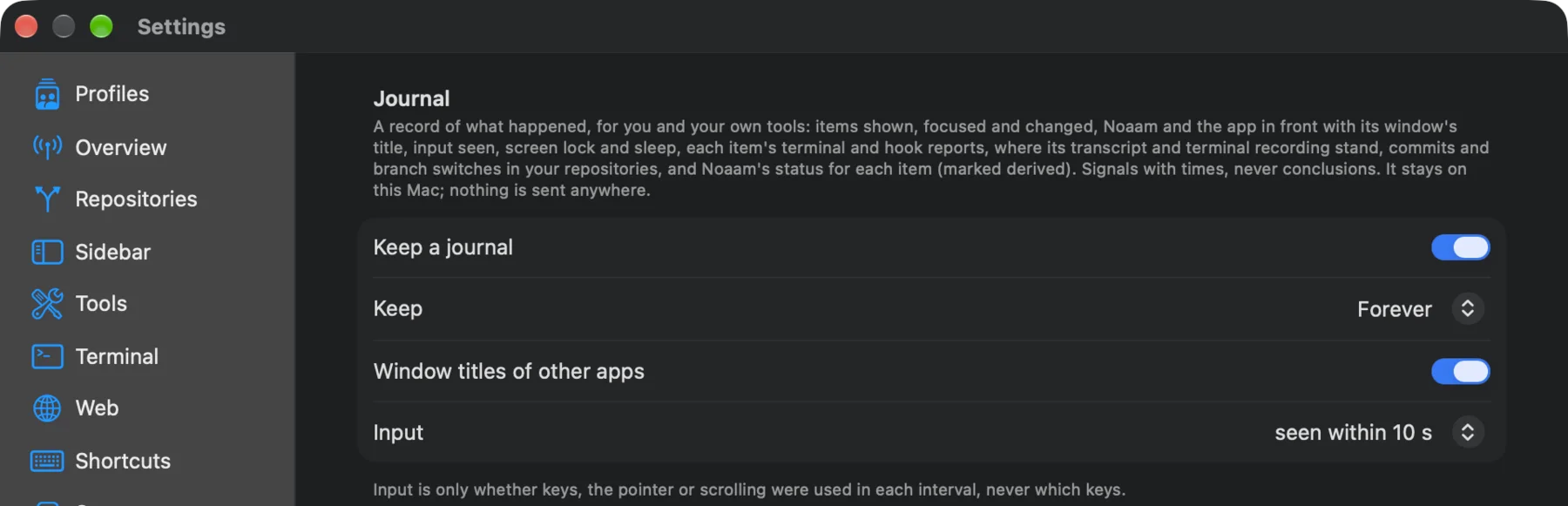
  <a href="/assets/blog/marta-journal-settings.webp"><img src="/assets/blog/marta-journal-settings.webp" width="1800" height="581" alt="Noaam's Journal settings: Keep a journal on, kept forever, window titles of other apps on, input seen within 10 seconds." loading="lazy" /></a>
  <figcaption>Settings › Journal. Below this, Teach an Agent sets up a session that knows how to read it.</figcaption>
</figure>

<p>Once, from Settings › Journal, she pressed <strong>Teach an Agent</strong>. That opened
a Claude Code session which installed Noaam’s skill, so any session she
starts afterwards knows how to read the journal. She keeps one session
at the top of the <code class="language-plaintext highlighter-rouge">Clients</code> folder for questions like this.</p>

<h2 id="friday-1630">Friday, 16:30</h2>

<p>She typed one message into that session:</p>

<blockquote>
  <p>Make me a timesheet of this week (Monday to Friday) by client. Only
count time I was actually looking at it and at the keyboard. Each client
is a folder here. Also give the agents’ working time per client as a
separate column, and check the apps in front for any meetings outside
Noaam.</p>
</blockquote>

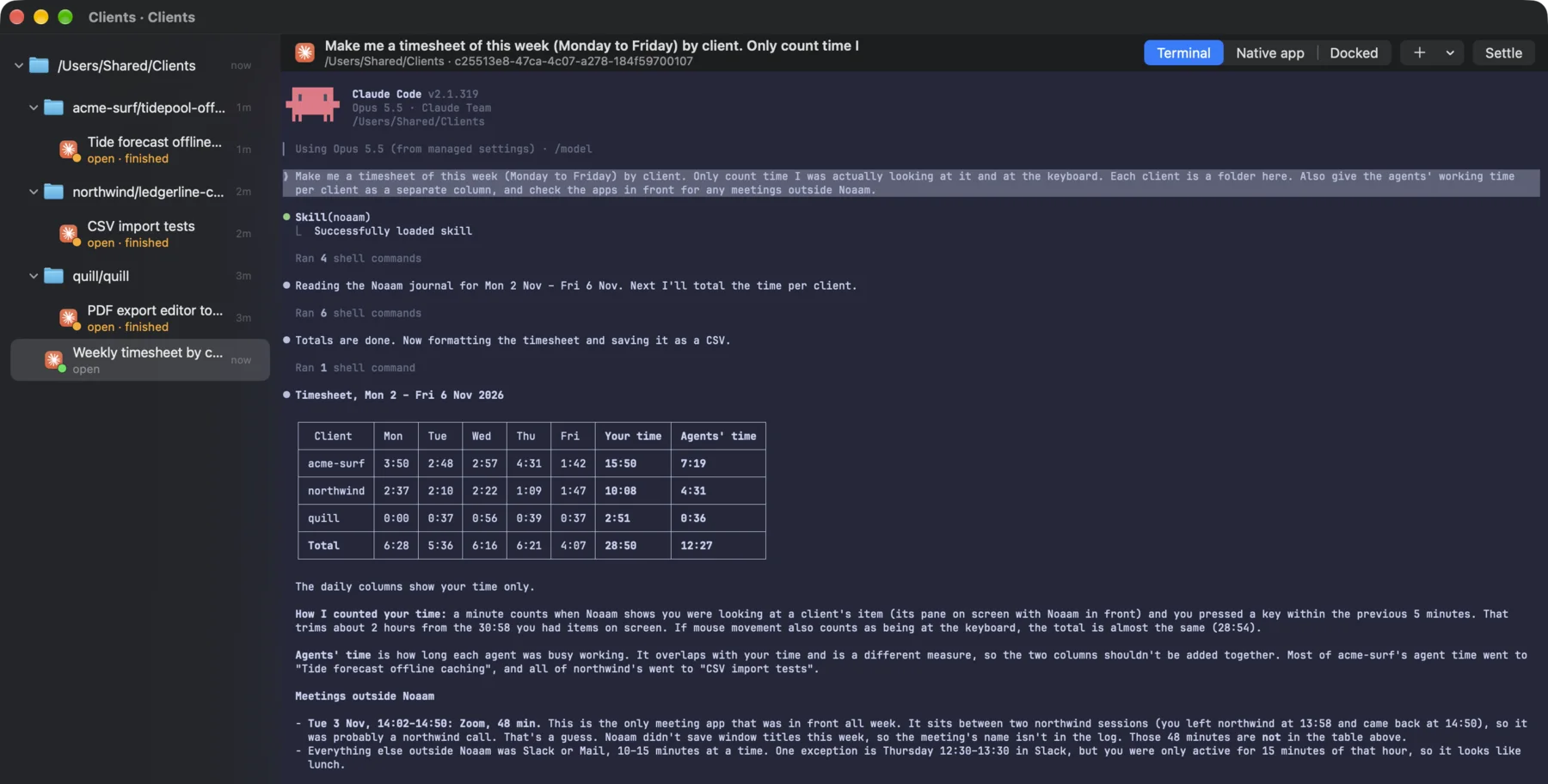
<p>About a minute later she had this:</p>

<figure>
  <a href="/assets/blog/marta-timesheet.webp"><img src="/assets/blog/marta-timesheet.webp" width="1800" height="912" alt="A Claude Code session in Noaam answering with a timesheet: per client and per day, her time and the agents' time, then how it counted and the meetings it found outside Noaam." loading="lazy" /></a>
  <figcaption>Her time per client and day, the agents' time next to it, and a Zoom call it found outside Noaam.</figcaption>
</figure>

<p>The agent explained how it had counted. A minute was hers when the
client’s item was on screen with Noaam in front and she’d used the
keyboard in the five minutes before. That trimmed about two hours from
the time things were simply open.</p>

<p>The agents’ column is a different measure, and the agent said not to add
the two together. On Tuesday afternoon both agents were working while she
was on the call, so the columns overlap.</p>

<h2 id="the-call-it-got-wrong">The call it got wrong</h2>

<p>The agent found one meeting app in front all week: Zoom, Tuesday from
14:02 to 14:50. It sat between two stretches of Northwind work, so the
agent guessed Northwind and said it was a guess. Window titles hadn’t
been recorded that week, so the journal had no meeting name to go on.</p>

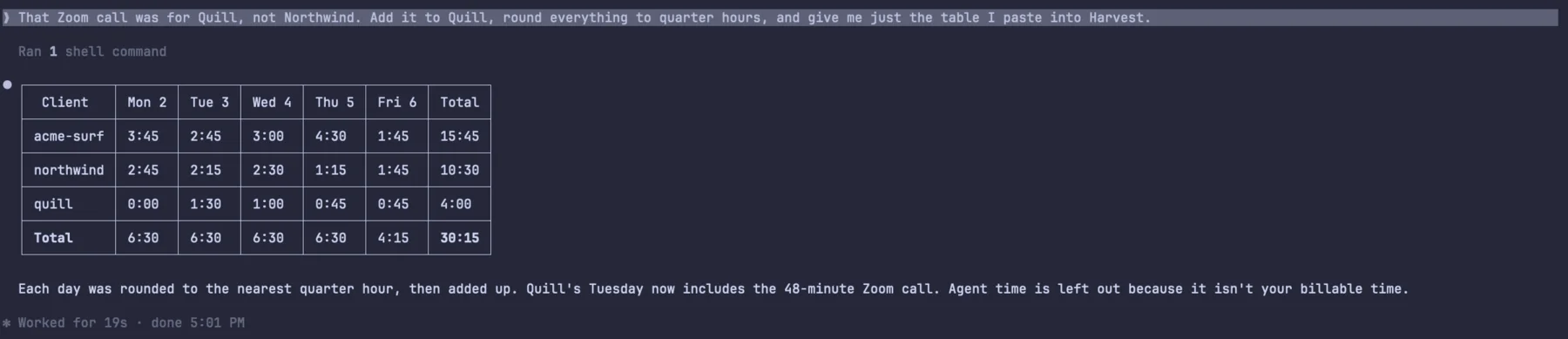
<p>It was Quill’s export call. She told it so:</p>

<figure>
  <a href="/assets/blog/marta-harvest.webp"><img src="/assets/blog/marta-harvest.webp" width="1800" height="389" alt="Her correction, and the agent's reply: the same timesheet rounded to quarter hours with the Zoom call added to Quill." loading="lazy" /></a>
  <figcaption>The version that goes into Harvest.</figcaption>
</figure>

<p>It also flagged an hour on Thursday when Slack was in front but she was
only active for fifteen minutes of it. It looked like lunch, so it left
it out, and she agreed.</p>

<p>She pasted the rounded table into Harvest: 15.75 hours for Acme Surf,
10.5 for Northwind, 4 for Quill. The Northwind invoice got one extra
line: agents worked about four and a half hours on their project this
week, mostly while she was busy with something else, and that time isn’t
billed.</p>

<p>Then she turned on <strong>Window titles of other apps</strong> in the Journal
settings, so next week the journal has the meeting’s name and the agent
won’t have to guess.</p>

<h2 id="if-youd-rather-run-it-yourself">If you’d rather run it yourself</h2>

<p>The agent is reading the same journal you can query from any terminal.
These two commands give the core of it, per repository (worktrees count
toward their repository):</p>

<div class="language-plaintext highlighter-rouge"><div class="highlight"><pre class="highlight"><code>noaam spans --ev viewing --since monday --by repo --gap 300
noaam spans --ev status --where activity=working --since monday --by repo
</code></pre></div></div>

<p><code class="language-plaintext highlighter-rouge">viewing</code> is on while an item’s pane is on screen with Noaam in front,
or while its own window has focus. <code class="language-plaintext highlighter-rouge">--gap 300</code> keeps only the time within
five minutes of input. The second command sums the stretches each agent
spent working. <code class="language-plaintext highlighter-rouge">noaam journal --ev app.front</code> lists the other apps that
came to the front, which is where the Zoom call came from.</p>

<h2 id="what-it-cant-see">What it can’t see</h2>

<p>A walk spent thinking about a bug isn’t in the journal, and neither is a
phone call. Anything outside Noaam only shows up as the app that was in
front, so a call needs her to say who it was for. She reads the table
before she pastes it, which takes a minute.</p>

<p>The whole thing took about ten minutes, and her Sunday evenings are free
again.</p>

<figure>
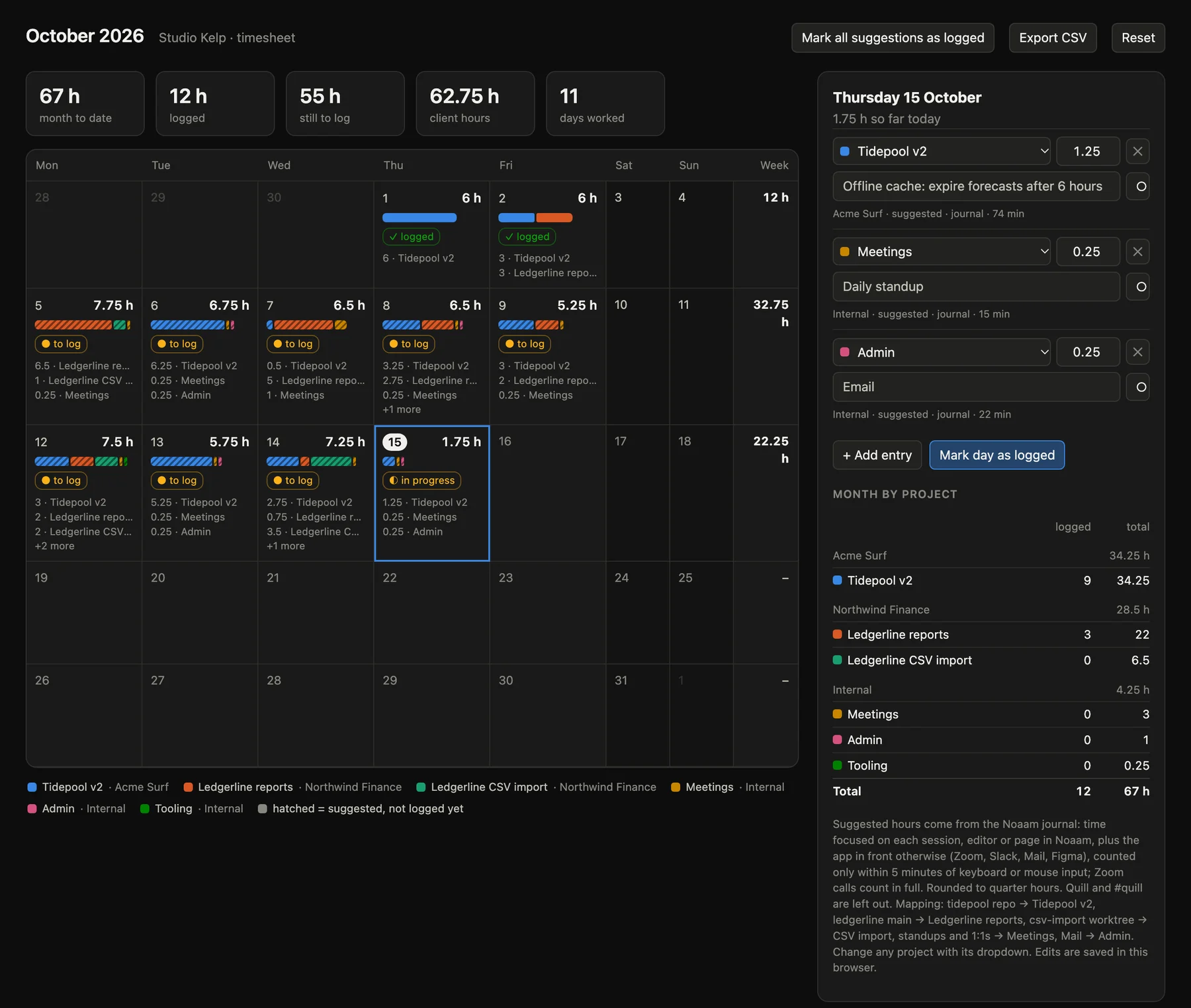
  <a href="/assets/shots/timesheet.webp"><img src="/assets/shots/timesheet.webp" width="1800" height="1523" alt="A month timesheet page Claude Code built from Noaam's journal, with hours per day colored by project and totals per client." loading="lazy" /></a>
  <figcaption>At the end of the month she asks for the whole month as a page: hours per day by client, what's logged and what isn't.</figcaption>
</figure>

<p class="end">Set it up: <a href="/docs/#the-journal">the journal</a> and <a href="/docs/#asking-it">asking it</a> in the guide.</p>]]></content><author><name></name></author><summary type="html"><![CDATA[A freelancer's Friday timesheet, built from the journal in ten minutes, with her hours and her agents' hours in separate columns.]]></summary></entry><entry><title type="html">Answering my agents while I cook</title><link href="https://noaam.dev/blog/answering-agents-while-cooking/" rel="alternate" type="text/html" title="Answering my agents while I cook" /><published>2026-11-08T10:00:00+00:00</published><updated>2026-11-08T10:00:00+00:00</updated><id>https://noaam.dev/blog/answering-agents-while-cooking</id><content type="html" xml:base="https://noaam.dev/blog/answering-agents-while-cooking/"><![CDATA[<p>Tom is an Android developer at a bank. He has two kids, four and seven.
In the evenings he works on the tide and surf forecast web app his surf
club uses, a repository called <code class="language-plaintext highlighter-rouge">tidepool</code>. His MacBook sits on the
kitchen counter, next to the chopping board.</p>

<h2 id="the-phone-didnt-fix-it">The phone didn’t fix it</h2>

<p>Between six and half past seven he cooks. He used to start an agent just
before, and when he sat down again at nine it had usually been waiting on
a permission prompt since ten past six. Two hours of evening, and the
agent had done five minutes of work.</p>

<p>So he set up a hook that pushed every prompt to his phone. That failed
for a boring reason. To answer, he had to dry his hands, unlock the
phone, read a shell command on a small screen and tap an option, all
while something was on the stove. Most evenings he left them for later,
which put him back where he started.</p>

<p>He doesn’t want to approve everything automatically either. The agents
run commands in his repository, and some of them he’d say no to. What he
wanted was to hear what an agent is asking, answer out loud, and leave
anything he couldn’t judge by ear for later.</p>

<h2 id="how-its-set-up">How it’s set up</h2>

<p>Every feature gets its own worktree, so two agents can work at once
without tripping over each other. Noaam shows each worktree as its own
folder in the sidebar, with its session underneath. A third Claude Code
session runs in the main checkout. That one is his assistant: the voice
talks to it, and it can see and act on the other two through the <code class="language-plaintext highlighter-rouge">noaam</code>
command.</p>

<figure>
  <a href="/assets/blog/tom-voice-settings.webp"><img src="/assets/blog/tom-voice-settings.webp" width="1800" height="600" alt="Noaam's Voice settings: Talk to is set to the voice assistant session in tidepool, and both alert switches are on." loading="lazy" /></a>
  <figcaption>Settings › Voice: the session he talks to, and the two alert switches.</figcaption>
</figure>

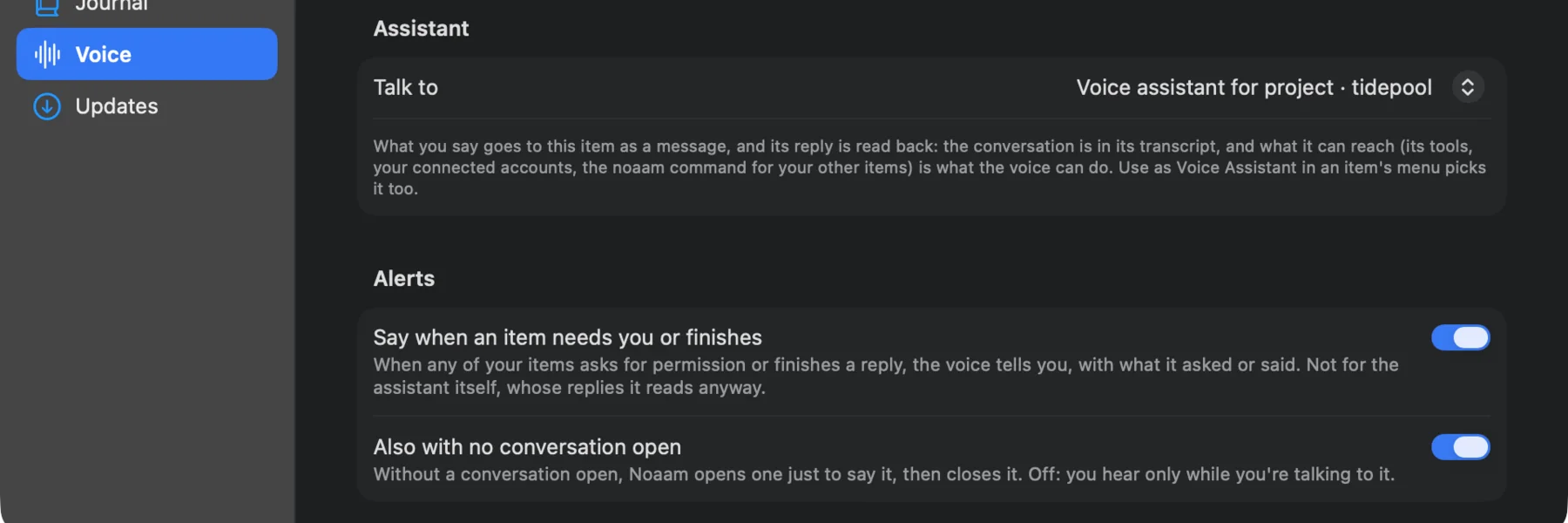
<p>In Settings › Voice he picked that session under <strong>Talk to</strong> (right-click
› Use as Voice Assistant does the same). Under Alerts he turned on <strong>Say
when an item needs you or finishes</strong> and <strong>Also with no conversation
open</strong>. With both on, the voice speaks up on its own when one of the
other sessions is waiting or done, and he doesn’t have to press anything
to hear it.</p>

<figure>
  <a href="/assets/blog/tom-remote-control.webp"><img src="/assets/blog/tom-remote-control.webp" width="1800" height="544" alt="Claude Code's tool settings in Noaam, Remote control section: Start new items, Send messages and Answer questions on, Interrupt a turn off." loading="lazy" /></a>
  <figcaption>Settings › Tools › Claude Code › Remote control. Each switch starts off.</figcaption>
</figure>

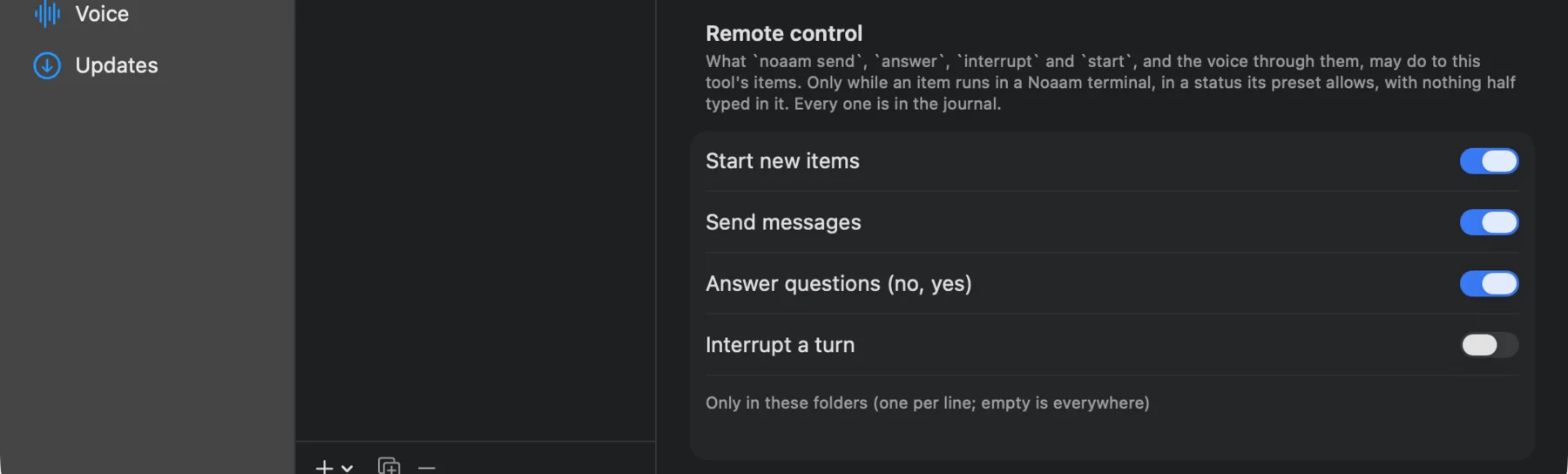
<p>Then, in Settings › Tools › Claude Code, he allowed <strong>Send messages</strong> and
<strong>Answer questions</strong> under Remote control. Without those, the assistant
can read what the other sessions are doing but can’t answer for him.
He left <strong>Interrupt a turn</strong> off. He’d rather stop a session himself.</p>

<p>His AirPods are in. The voice key is <kbd>⌃⌥Space</kbd>, and a towel
hangs off the laptop’s edge.</p>

<h2 id="a-tuesday">A Tuesday</h2>

<p><strong>18:05.</strong> He starts two sessions from the composer. One adds a dark
mode in <code class="language-plaintext highlighter-rouge">tidepool-dark-mode</code>, following the system setting and keeping
the tide chart readable in both. The other, in <code class="language-plaintext highlighter-rouge">tidepool-offline-cache</code>,
keeps the last forecast on the phone for when the beach has no signal.
Then he starts on the onions.</p>

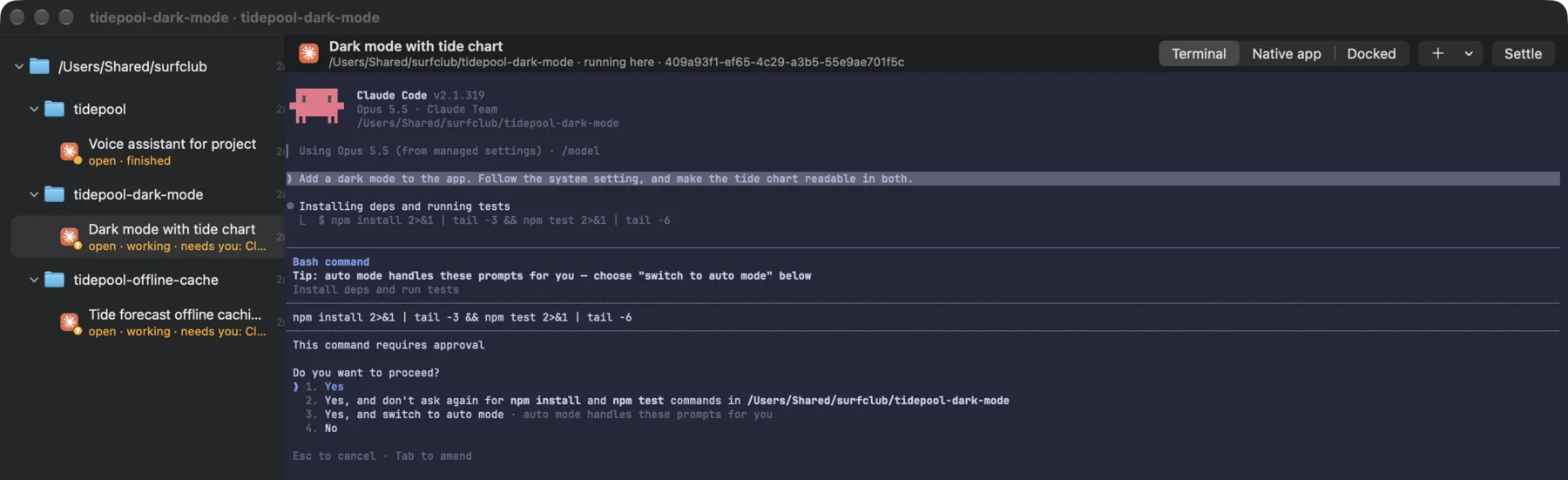
<p><strong>18:12.</strong> Both sessions want to install dependencies and run the tests.
The sidebar would show it if he looked: each one says <em>needs you</em> in
orange. He doesn’t look. The voice tells him: the dark mode session wants
to run <code class="language-plaintext highlighter-rouge">npm install</code> and <code class="language-plaintext highlighter-rouge">npm test</code>, and so does the offline one.</p>

<figure>
  <a href="/assets/blog/tom-needs-you.webp"><img src="/assets/blog/tom-needs-you.webp" width="1800" height="551" alt="Noaam with the tidepool folder and its two worktrees in the sidebar. Both sessions say needs you; the dark mode session's pane shows Claude Code asking to run npm install and npm test." loading="lazy" /></a>
  <figcaption>What both sessions were waiting on. The voice reads him the command.</figcaption>
</figure>

<p>He wipes his hand, presses the key and says: “Yes to both. And tell the
dark mode one not to add a theming library, use the CSS variables we
already have.” The assistant answers both prompts, then sends that
sentence to the dark mode session as a message. Both go back to work.</p>

<p>His seven-year-old asks why he’s talking to the fridge. He tells her
he’s talking to the computer, which she finds more reasonable.</p>

<p><strong>18:41.</strong> The offline session asks to write a file outside its folder,
into a shared config. He wouldn’t approve that by ear. He says “no, ask
me later,” the assistant answers no, and the session carries on without
it.</p>

<p><strong>19:00.</strong> The voice says the offline session has finished and reads its
summary: forecasts are stored for six hours, there’s a “last updated”
label, and the tests pass.</p>

<h2 id="2100">21:00</h2>

<p>The kids are asleep. He opens the assistant’s session and scrolls back.
Everything he said that evening is there as text, with what the
assistant did about each one. Then he opens the two diffs and reviews
them properly. He merges the offline one. The dark mode branch needs
another pass on the chart colours, so he types a message to that session
and goes to bed.</p>

<p>Nothing got merged from the kitchen. The voice kept the work moving
while his hands were busy, and anything he couldn’t judge by ear waited
for the screen.</p>

<figure>
  <video src="/assets/shots/voice.mp4" poster="/assets/shots/voice-poster.webp" width="1920" height="1206" controls="" playsinline="" preload="metadata" aria-label="Talking to Noaam: asking what three sessions are up to, telling one to go ahead with its tests, asking another to run its tests, and hearing that a third has finished."></video>
  <figcaption>The same kind of evening, out loud: three sessions, one voice.</figcaption>
</figure>

<h2 id="worth-knowing">Worth knowing</h2>

<p>The sessions have to run in Noaam’s own terminal, not a docked window,
for the voice to answer them. When the voice reads a permission prompt,
it expects a yes or a no, and asks again if it gets anything else. The
voice uses OpenAI Live by default with your own API key, about five cents
a minute while a conversation is open. What it heard and said is also in
the journal, under <code class="language-plaintext highlighter-rouge">noaam journal --ev voice</code>.</p>

<p class="end">Set it up: <a href="/docs/#voice">Voice</a> in the guide.</p>]]></content><author><name></name></author><summary type="html"><![CDATA[Two agents run in worktrees while dinner happens. The voice says when one is stuck, and he answers out loud with wet hands.]]></summary></entry><entry><title type="html">How many hours my side project really gets</title><link href="https://noaam.dev/blog/side-project-hours/" rel="alternate" type="text/html" title="How many hours my side project really gets" /><published>2026-11-08T09:00:00+00:00</published><updated>2026-11-08T09:00:00+00:00</updated><id>https://noaam.dev/blog/side-project-hours</id><content type="html" xml:base="https://noaam.dev/blog/side-project-hours/"><![CDATA[<p>Lukas is a platform engineer at an insurance company. Most of his day job
happens inside a remote desktop, but the team’s Helm charts are open
source and he works on them from his own MacBook, with Claude Code.</p>

<p>In the evenings he builds Tally, a habit tracker that lives in the Mac’s
menu bar. It has two repositories: <code class="language-plaintext highlighter-rouge">tally</code> for the app and <code class="language-plaintext highlighter-rouge">tally-site</code>
for its landing page. He works on both with Claude Code sessions in
Noaam, and writes the SwiftUI in Xcode.</p>

<h2 id="two-profiles-two-journals">Two profiles, two journals</h2>

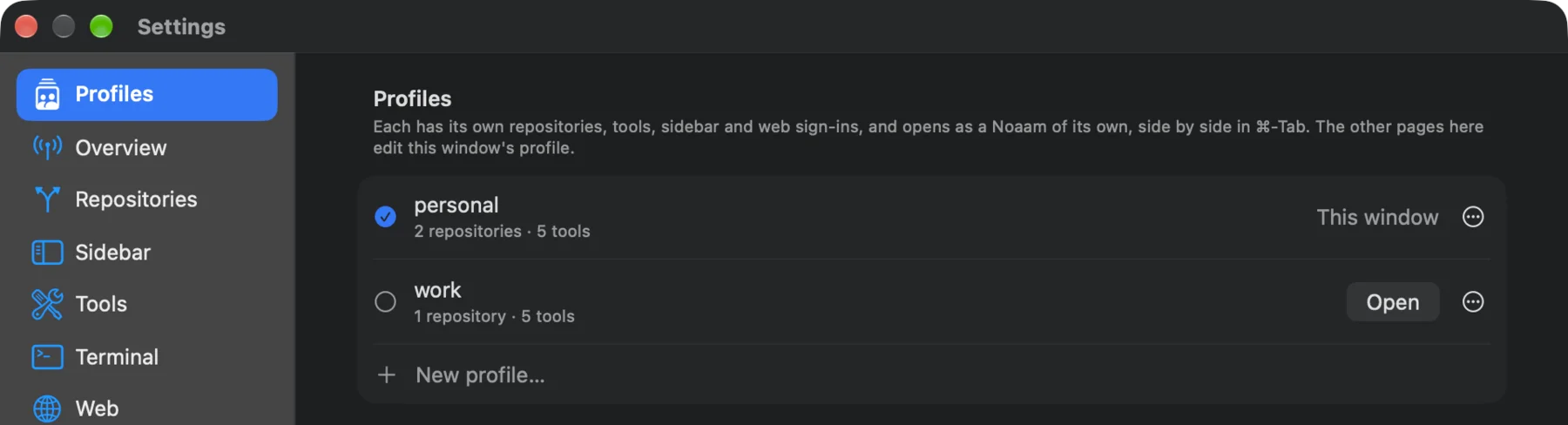
<p>He keeps the job and the app apart with two Noaam profiles, <em>work</em> and
<em>personal</em>. Each opens as its own Noaam, with its own window, Dock icon
and ⌘-Tab entry. Each has its own repositories, and its own sign-ins for
web pages, so the on-call dashboard’s login only exists in <em>work</em>.</p>

<figure>
  <a href="/assets/blog/lukas-profiles.webp"><img src="/assets/blog/lukas-profiles.webp" width="1800" height="488" alt="Noaam's Profiles settings: personal with two repositories, this window, and work with one repository, with an Open button." loading="lazy" /></a>
  <figcaption>Settings › Profiles. He opens <em>work</em> at 8:45 and quits it when the work day ends.</figcaption>
</figure>

<p>Each profile also keeps its own journal. That’s what made his question
answerable without any setup: he never started or stopped a timer, and
the <em>personal</em> journal had been recording every evening anyway. Which
item he was looking at, when he was typing, which app was in front. None
of the day job is in it.</p>

<h2 id="the-number-hed-been-quoting">The number he’d been quoting</h2>

<p>When friends asked, he said Tally got about fifteen hours a week. He had
a plan built on it: streaks and reminders were done, and for 1.0 he
wanted a widget and iCloud sync, out before Christmas. His own estimates
were twenty hours for the widget and thirty for sync.</p>

<p>On Sunday morning, in a Claude Code session in the <code class="language-plaintext highlighter-rouge">tally</code> folder, he
asked:</p>

<blockquote>
  <p>How much time did Tally actually get this week? Count my time in Noaam
and in Xcode, only when I was at the keyboard, and show me the commands
you ran.</p>
</blockquote>

<h2 id="the-answer">The answer</h2>

<figure>
  <a href="/assets/blog/lukas-hours.webp"><img src="/assets/blog/lukas-hours.webp" width="1800" height="1035" alt="A Claude Code session answering: about 6 hours 32 minutes this week, 4h15 in Noaam and 2h17 in Xcode, with a table, the time by day, what it left out and the commands it ran." loading="lazy" /></a>
  <figcaption>Six and a half hours, with what it counted, what it left out, and every command.</figcaption>
</figure>

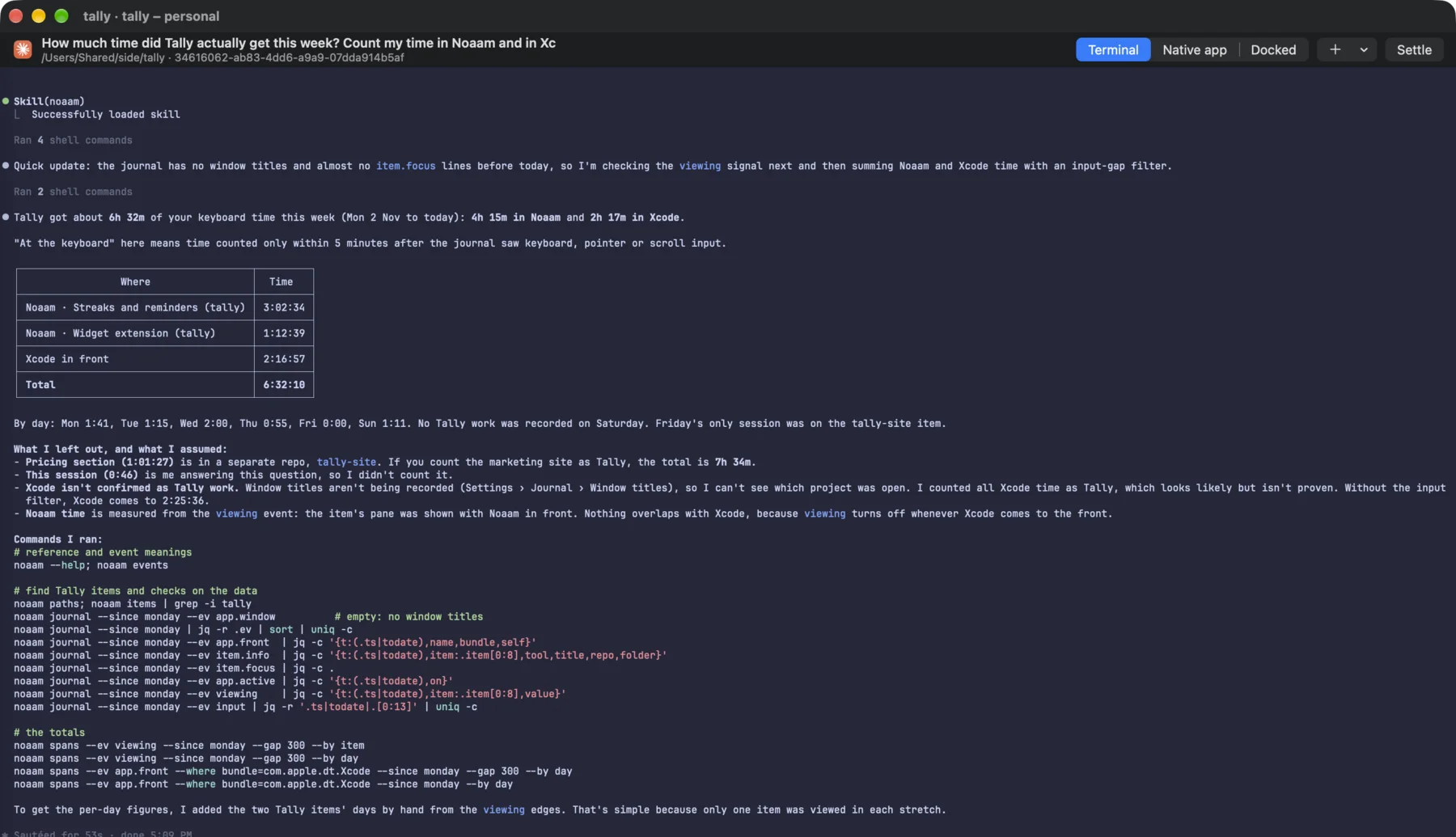
<p>Six and a half hours: four and a quarter in Noaam, the rest in Xcode.
Seven and a half if he counts the landing page. By day it was an hour
and forty minutes on Monday, an hour and a quarter on Tuesday, two on Wednesday, under an hour
on Thursday, nothing for the app on Friday and nothing at all on
Saturday. Most of it happened between nine and eleven at night.</p>

<p>The agent was clear about what it couldn’t prove. Window titles weren’t
being recorded, so it couldn’t tell which project Xcode had open. It
counted all the Xcode time as Tally, which is very likely right, and said
so. It left out the pricing page and its own session. It also gave the
Xcode number without the keyboard filter, so he could see the
difference: about ten minutes of builds he’d walked away from.</p>

<h2 id="doing-it-by-hand">Doing it by hand</h2>

<p>The answer rests on two commands, which work in any terminal:</p>

<div class="language-plaintext highlighter-rouge"><div class="highlight"><pre class="highlight"><code>noaam spans --ev viewing --since monday --gap 300 --by day
noaam spans --ev app.front --where bundle=com.apple.dt.Xcode --since monday --gap 300 --by day
</code></pre></div></div>

<p>The first sums the time an item’s pane was on screen with Noaam in
front. The second sums the time Xcode was the app in front. <code class="language-plaintext highlighter-rouge">--gap 300</code>
keeps only the time within five minutes of a keystroke or click, in both.
<code class="language-plaintext highlighter-rouge">--by item</code> instead of <code class="language-plaintext highlighter-rouge">--by day</code> splits the first one by session, which
is how the agent kept the landing page apart.</p>

<p>One thing to know with profiles: the app in front is recorded by
whichever Noaam is running. Xcode time from the evening only lands in
<em>personal</em> because <em>work</em> is closed by then.</p>

<h2 id="what-changed">What changed</h2>

<p>At seven and a half hours a week, the widget and sync together need
about seven weeks, which is past Christmas. The widget alone needs under
three. He moved iCloud sync to after 1.0 and kept the date.</p>

<p>He turned on window titles in Settings › Journal, so next Sunday the
Xcode time comes with the project name. And he stopped saying fifteen.</p>

<p class="end">The same journal makes timesheets for client work: <a href="/blog/billing-three-clients/">Billing three clients when the agents work at the same time</a>. Set it up: <a href="/docs/#profiles">Profiles</a> and <a href="/docs/#the-journal">the journal</a> in the guide.</p>]]></content><author><name></name></author><summary type="html"><![CDATA[A day job, a Mac app in the evenings, and two Noaam profiles that keep them apart. On Sunday he asked how much time the app really got.]]></summary></entry></feed>